

Choose a setup
Three ways to run OrkStage end to end, from a laptop with no cloud account to a production install with every provider, and the steps for each.
OrkStage runs the same way in all three setups: the console guides you through Getting started, a
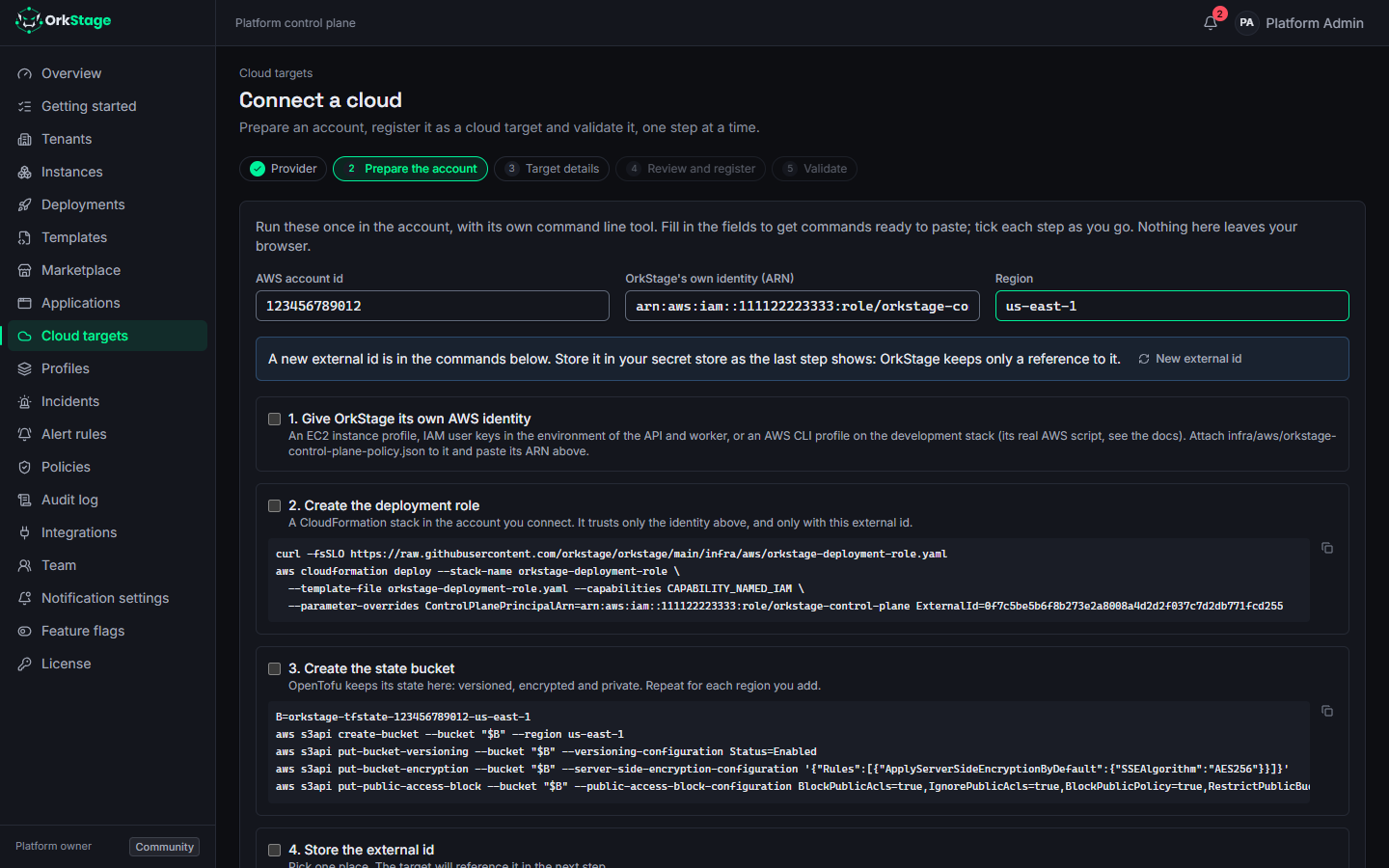
cloud account becomes a cloud target with the Connect a cloud wizard (or ork targets add),
and every target is validated before anything deploys to it. What changes is where the resources land.
| Local, with MiniStack | Free tier accounts | Production, every provider | |
|---|---|---|---|
| What you get | Real ECS, RDS and ElastiCache containers on your machine, emulating AWS | Real resources in your own AWS, Azure or OCI accounts | OrkStage behind HTTPS with SSO, serving tenants on any provider |
| Cloud account | None | One per cloud, on its free offer | Your accounts, one per environment |
| Cost | Nothing | Credits from the free offer (about a dollar a day for the test environment) | Your cloud bill; OrkStage Community is free |
| Time | About 15 minutes | About an hour per cloud | Half a day, then about 30 minutes per account |
| Page | This page | Free tier accounts | This page, then production install |
Every provider, the wizard and the CLI are part of OrkStage Community. The Enterprise edition adds identity, governance and compliance features (SAML, SCIM, custom roles, audit export and more); the editions page compares them.
Local, with MiniStack
The fastest way to see every tool work. Nothing leaves your machine.
Start the stack
git clone https://github.com/orkstage/orkstage-dev && cd orkstage-dev
pnpm bootstrap
pnpm platform:up      # Postgres, Redis, Mailpit, MiniStack, API, worker, console
Requirements and ports are in the quickstart.
Sign in and follow the guided setup
Open http://localhost:3000 and sign in with the development login as admin@example.local. A welcome
dialog offers the guided setup; Getting started in the navigation shows the same steps with their
progress, and it stays useful after the first visit.
Validate the MiniStack target
The seed registers Local AWS (MiniStack). Open Cloud targets and click Validate: OrkStage reaches the emulator, creates the state bucket and reports each check. To try the wizard itself, click Connect a cloud, choose Simulation, and register a target that imitates AWS, Azure or OCI.
Deploy and watch
Create an instance of Starter standard (or the smaller Portable starter) on the MiniStack target, review the plan and cost, and deploy. Then try the rest of the loop: health and logs on the instance page, an incident by stopping a container, the status page, a webhook, and Destroy. Local AWS lists what MiniStack does not emulate (autoscaling, some drift results).
To deploy to a real AWS account from this same local stack, start it with one of your AWS CLI profiles
as OrkStage's own identity: AWS_PROFILE=<profile> pnpm platform:aws-real. Secrets that targets
reference with env://NAME go in a .env.local file at the workspace root, which Git ignores; restart
the API and worker after changing it.
Free tier accounts
To prove OrkStage against real clouds without a bill, use the free offers of AWS, Azure and Oracle Cloud with the Portable starter template: a network, one web service and the provider's ingress, which every infrastructure provider can run. The free tier guide walks through each cloud, what its offer covers and what to watch.
Production, every provider
Install OrkStage
Follow the production install: a Linux host with Docker, a domain,
deploy/compose.yaml with Caddy for HTTPS, Postgres and Redis bundled or managed, one OIDC provider
for sign in, and SMTP for invitations. The first person to sign in with PLATFORM_OWNER_EMAIL becomes
the platform owner.
Give OrkStage its cloud identities
- AWS: one identity for OrkStage itself (an EC2 instance profile, or IAM user keys in
.env) withinfra/aws/orkstage-control-plane-policy.json. It assumes a role in every account you connect; see connecting AWS. - Other providers: a credential per account (service principal, API key, signing key), kept in a
secret store: environment variables of the API and worker (
env://NAME) or AWS Secrets Manager (aws-sm://name). The provider pages list the fields.
Turn on the providers you use
Only AWS and the simulation are on by default. As platform owner, open Settings > Feature flags
and turn on each provider (PROVIDER_AZURE, PROVIDER_GCP, PROVIDER_OCI, PROVIDER_VERCEL
and so on), or do it from the first step of the Connect a cloud wizard. The other providers are in
preview: built and tested, not yet proven against live accounts.
Connect each account
Run Connect a cloud once per account and environment (for example aws-staging and
aws-production). The wizard gives you the commands to prepare the account, registers the target
and validates it. From a terminal, ork targets add asks the same questions:
ork targets add --provider azure --name azure-production --environment productionProfiles, tenants and the first instance
Create one profile per environment (for example Production with AWS on aws-production and Azure
on azure-production) and mark it as the default. Create a tenant for each customer or team, set
its limits, invite its owners, and deploy the first instance from a template.
Optional: an Enterprise license
Put the key in ORKSTAGE_LICENSE_KEY for the API and worker and restart them. Settings > License
shows what it grants. Without a key, OrkStage runs the Community edition, complete for self hosting.
Quickstart
Run the full OrkStage platform locally with Docker Compose, sign in with the development login and deploy your first instance in about ten minutes.
Free tier accounts
Prove OrkStage against real AWS, Azure and Oracle Cloud accounts on their free offers, with the Portable starter template, a budget alert and a clean teardown.