

Custom domains
Serve an instance on your own hostname. Prove you own it with a TXT record, point it at the platform, and let OrkStage watch its TLS certificate.
Every instance with a dns resource gets a platform subdomain in the zone of its cloud target,
for example production-acme.apps.example.com, with a managed certificate. You can also serve it
on hostnames you own, such as api.acme.com.
What the template allows
A custom domain attaches to a resource that can serve one:
- a
dnsresource whosecustomDomainisoptionalorrequired(it isdisabledby default); - a
web.frontendresource (Vercel, Render and the other frontend providers).
The tenant also needs the CUSTOM_DOMAINS feature, and the maxDomainsPerInstance limit, when
set, caps how many custom domains one instance has. The platform subdomain does not count.
Adding a domain
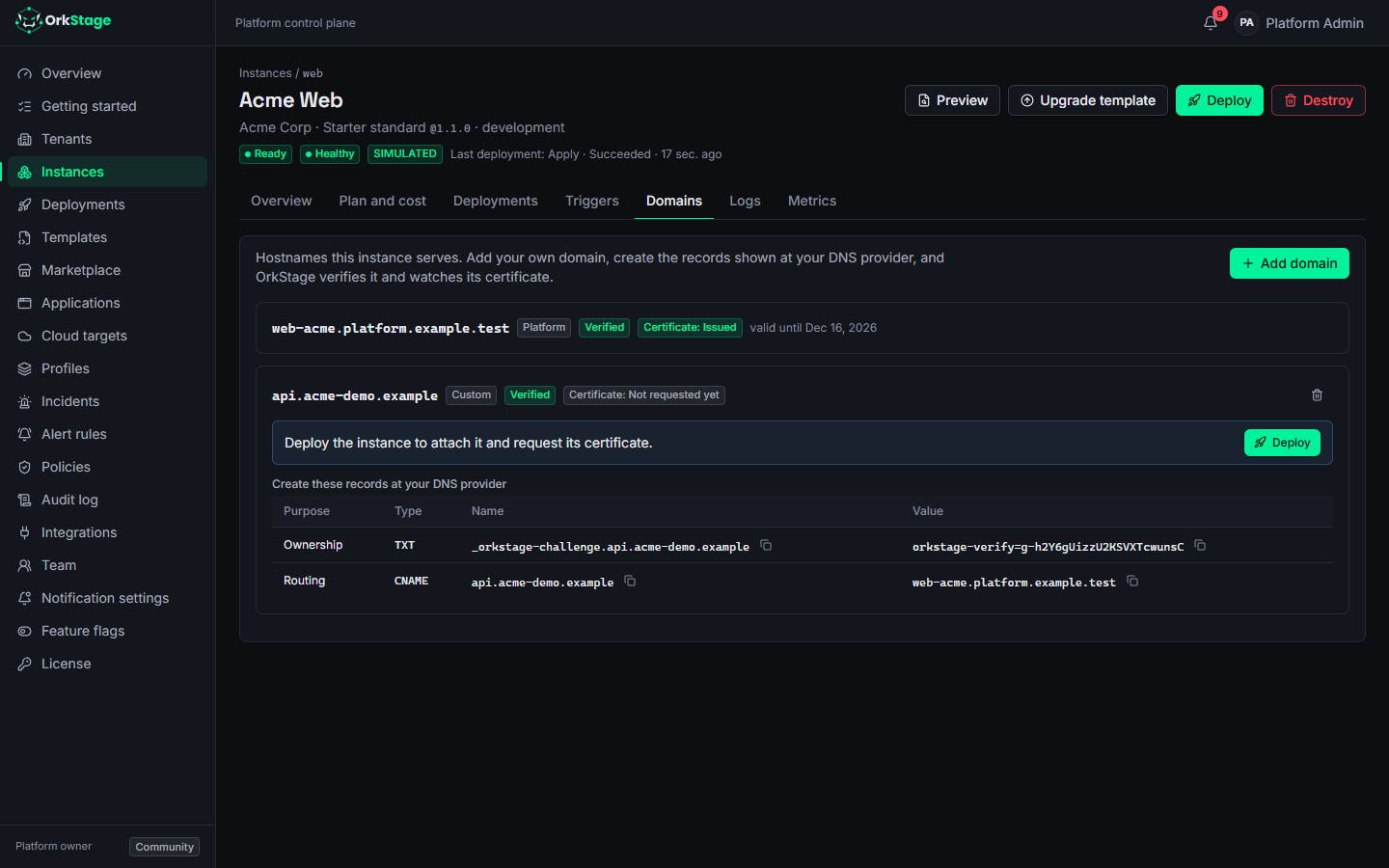
- Open the instance, then the Domains tab, and choose Add domain.
- Enter the hostname. When the instance has more than one resource that can serve it, choose one.
- Create the records the tab shows at your DNS provider:
| Purpose | Record | Value |
|---|---|---|
| Ownership | TXT _orkstage-challenge.<hostname> | The token shown, starting with orkstage-verify= |
| Routing | CNAME <hostname> | The platform subdomain, or the frontend's own host |
| Certificate | CNAME records from the certificate authority | Shown once the certificate is requested |
OrkStage looks up the TXT record about once a minute; Check now looks again on the next pass. When it finds the record, the domain is Verified and you get a notification. A domain whose record does not appear within 7 days is marked Not verified; Check now gives it another 7 days.
- Deploy the instance. The deployment attaches the domain to its resource and requests a certificate for it.
On AWS, the certificate for your hostnames comes from ACM and is validated with the CNAME records shown under Certificate, which you create at your DNS provider, because the zone is yours. Once ACM issues it, OrkStage tells you, and the next deployment adds it to the HTTPS listener of the load balancer. Leave the validation records in place: ACM renews the certificate with them.
Certificates and expiry
OrkStage reads the state of each certificate every few minutes: waiting for validation, issued, expiring soon (30 days or less) or expired. The tenant's owners and admins are notified 30, 14, 7 and 1 day before a certificate expires, once each. A renewed certificate starts the countdown again.
Who can use a hostname
A hostname belongs to one instance on the whole platform. Adding a hostname that another instance
already has fails with DOMAIN_TAKEN, without saying which tenant has it. Hostnames inside the
platform zone are refused. A claim that failed verification does not hold the hostname: someone
who owns it can add it to their own instance.
Removing a domain
Removing a custom domain takes it off the list at once. The next deployment detaches it and its
certificate. The platform subdomain goes away with its dns resource.
Through the API
| Request | What it does |
|---|---|
GET /instances/:id/domains | Domains with their state and the records to create |
POST /instances/:id/domains | Adds { "hostname": "api.acme.com", "resourceId": "dns" } (resourceId is optional) |
POST /domains/:id/verify | Looks up the TXT record on the next pass |
DELETE /domains/:id | Removes a custom domain |
Changing domains needs the instances:write scope.
On simulated targets
Simulated instances use a simulated DNS. The Create the TXT record (simulation) button, or
POST /instances/:id/simulate with { "resourceId": "dns", "domain": { "hostname": "...", "ownershipRecord": true } }, creates the ownership record, so the whole flow works without a real
zone. certificateExpiresAt in the same object pins when the simulated certificate expires.
Topology, logs and metrics
Inspect a running OrkStage instance. The topology diagram with placement and health, drift, resource outputs, recent logs and metrics per resource.
Status page and incidents
How OrkStage derives instance health, shows it on a status page per tenant, opens incidents from health checks and metrics, and posts incident updates.