

Status page and incidents
How OrkStage derives instance health, shows it on a status page per tenant, opens incidents from health checks and metrics, and posts incident updates.
From resource health to instance health
The worker's health monitor checks every active resource through its provider adapter at a fixed
interval: HEALTH_CHECK_INTERVAL_SECONDS, 30 by default. Instance health then follows from the
health of its components:
| Components | Instance |
|---|---|
A critical component is UNHEALTHY | UNHEALTHY |
Any component is UNHEALTHY or DEGRADED | DEGRADED |
Some components are UNKNOWN | DEGRADED (UNKNOWN when all are unknown) |
All components are in MAINTENANCE | MAINTENANCE |
| Otherwise | HEALTHY |
Services and databases are critical by default. Caches, queues and storage are not. A template can
change this per resource with the critical field.
The status page
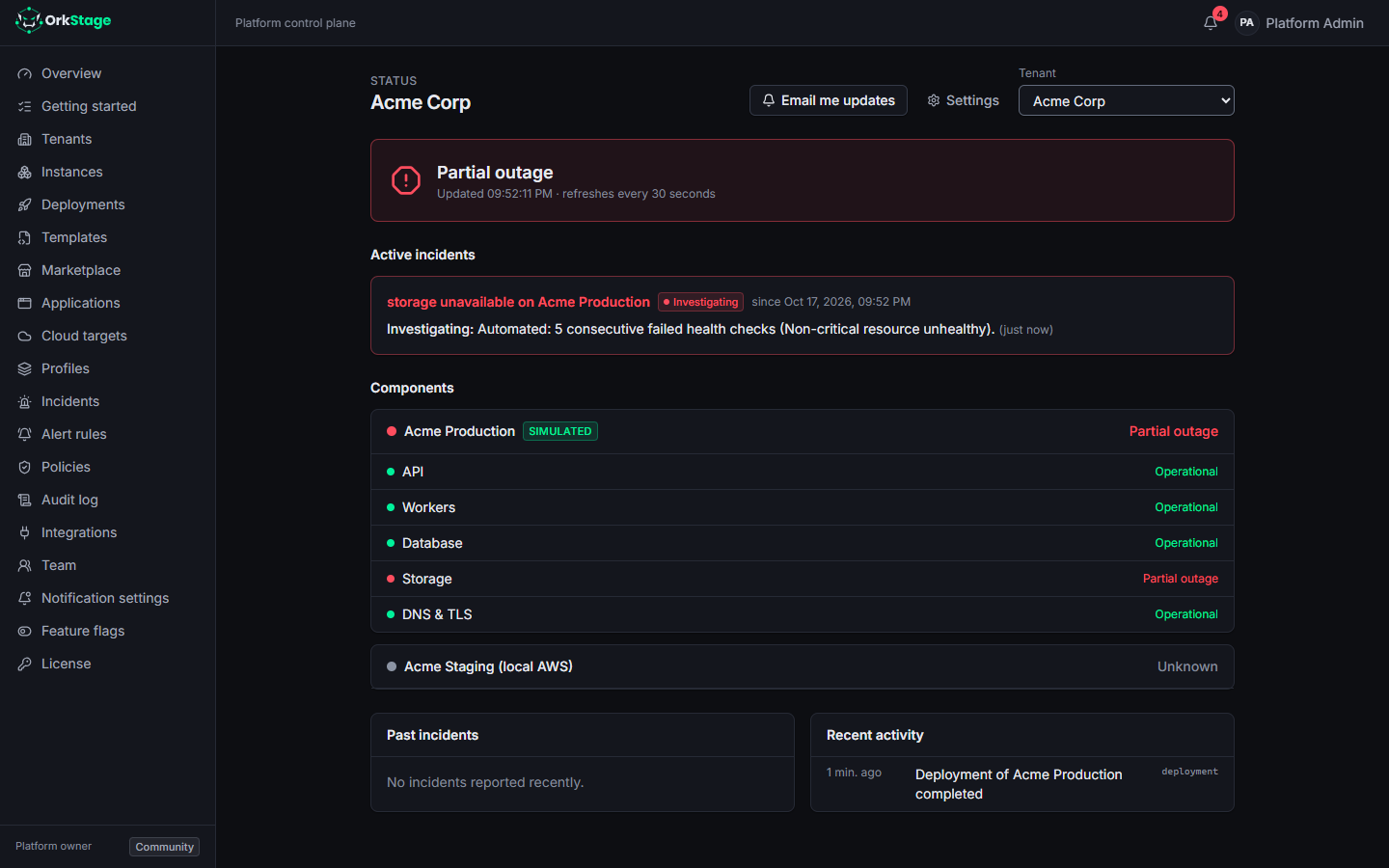
Each tenant has a status page, at /status/<tenantId> in the console. It groups resources into
components that customers see: API, Workers, Database, Cache, Messaging, Storage, and DNS & TLS.
The headline shows the worst component state.
| Health | Status component |
|---|---|
HEALTHY | OPERATIONAL |
DEGRADED | DEGRADED |
UNHEALTHY (critical) | MAJOR_OUTAGE |
UNHEALTHY (not critical) | PARTIAL_OUTAGE |
MAINTENANCE | MAINTENANCE |
| anything else | UNKNOWN |
Who can see it
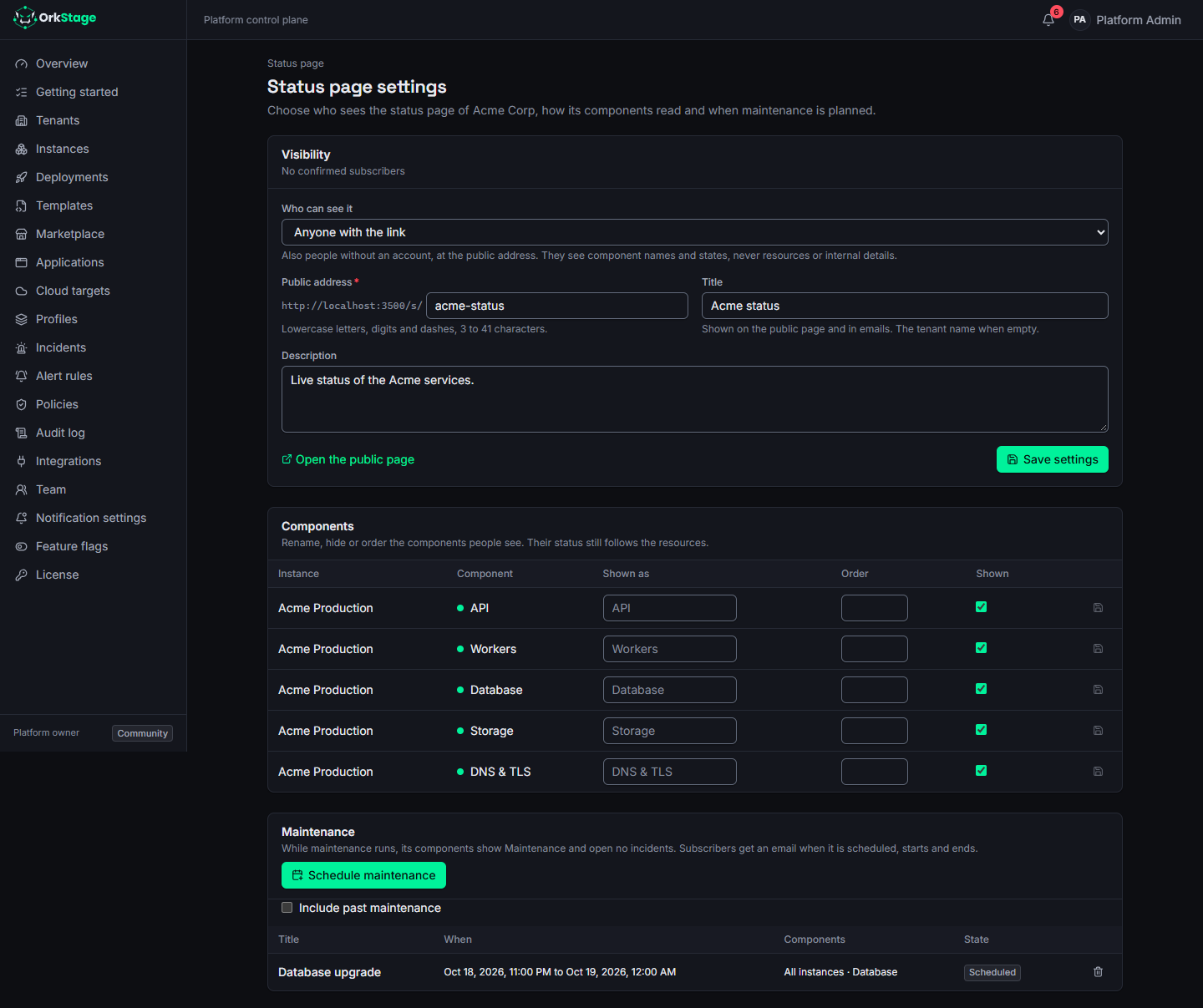
Tenant owners and admins choose under Settings on the status page
(/status/<tenantId>/settings):
| Visibility | Who reads the page |
|---|---|
| Owners and admins only | Platform staff and the tenant's owners and admins |
| Every member of the tenant (default) | Everyone in the tenant, after signing in |
| Anyone with the link | Also people without an account, at /s/<address> |
A public page shows the title and description you set, component names and states, incidents and maintenance. It never shows resource ids, providers, regions or alert details. Incidents that OrkStage opened on its own read as a plain impact, such as "Degraded performance on Acme production", and their automatic updates as plain sentences. Incidents and updates written by people appear as written. Resolved incidents stay listed for 14 days. The public address is answered with its own rate limits, and an address that is not public looks exactly like one that does not exist.
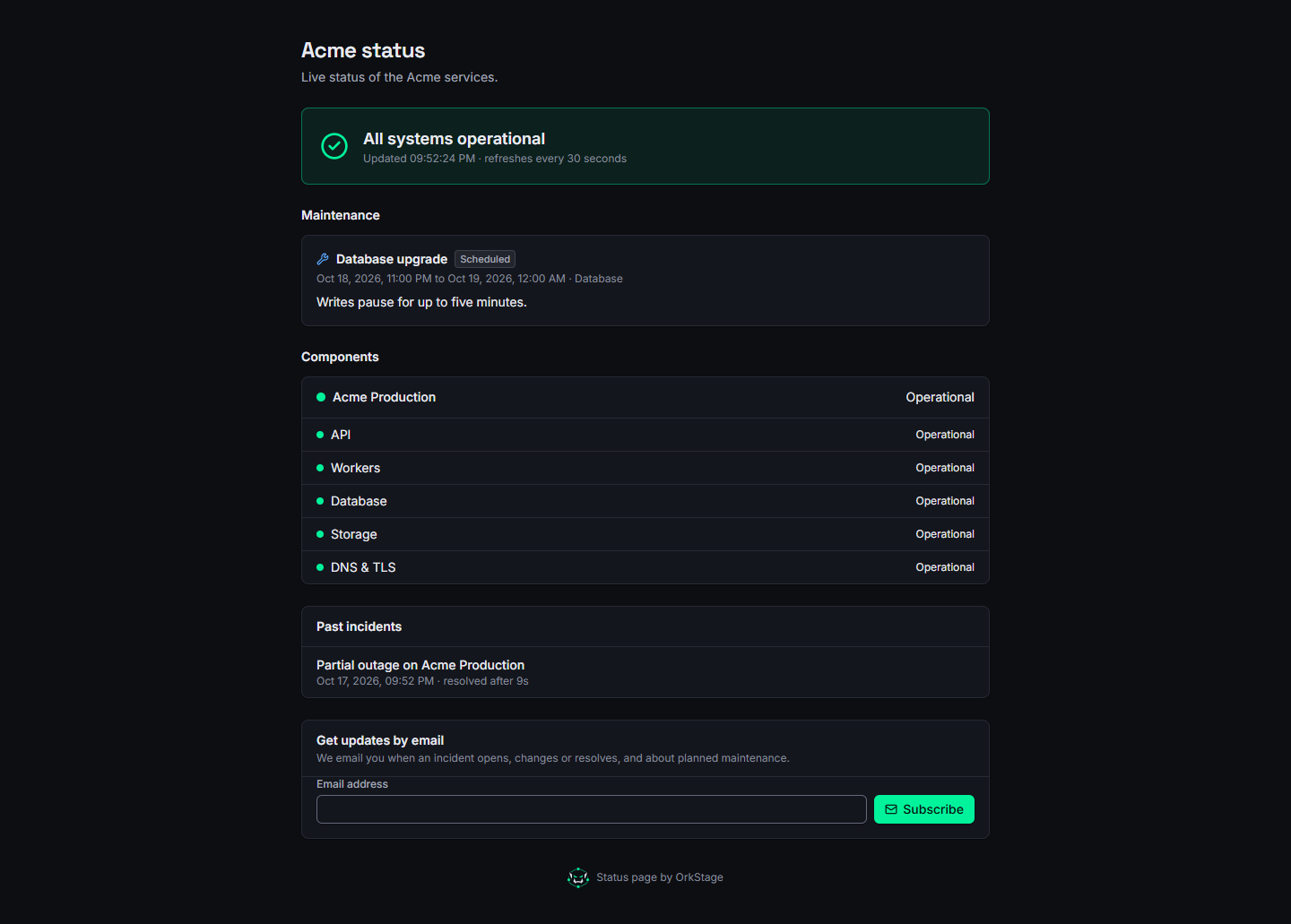
Components
The same settings page renames components (for example API to Checkout), hides them or changes their order. Their status still follows the resources behind them.
Email updates
Anyone who can read the page can get an email when an incident opens, changes or resolves, and when maintenance is scheduled, starts and ends:
- In the console, Email me updates on the status page subscribes your own address at once.
- On a public page, people enter an address and confirm it from the email they receive.
Every email ends with an unsubscribe link. People who subscribed on the public page stop getting emails while the page is not public. The settings page shows how many confirmed subscribers there are. Emails go through the SMTP server of the platform (see configuration).
Automated incidents
Alert rules decide when OrkStage opens an incident on its own. There are two kinds:
- Health rules count failed health checks in a row.
- Metric rules compare a statistic of a metric (average, maximum or minimum) over a window of minutes with a threshold, for example "average CPU % above 80 over 5 minutes".
OrkStage seeds two health rules:
| Rule | Opens an incident after | Severity | Cooldown |
|---|---|---|---|
Critical resource unhealthy | 3 failed health checks in a row | high | 15 minutes |
Non-critical resource unhealthy | 5 failed health checks in a row | medium | 30 minutes |
Incidents follow three rules:
- They are deduplicated per rule and resource. A resource has at most one open incident for a rule, so a flapping resource never opens many.
- After an incident resolves, a cooldown passes before a new one can open for the same resource and rule.
- They are resolved automatically when health returns or the metric is back within the threshold, with a final update. A rule with Resolve when it clears turned off leaves the incident open for a person to close.
Managing alert rules
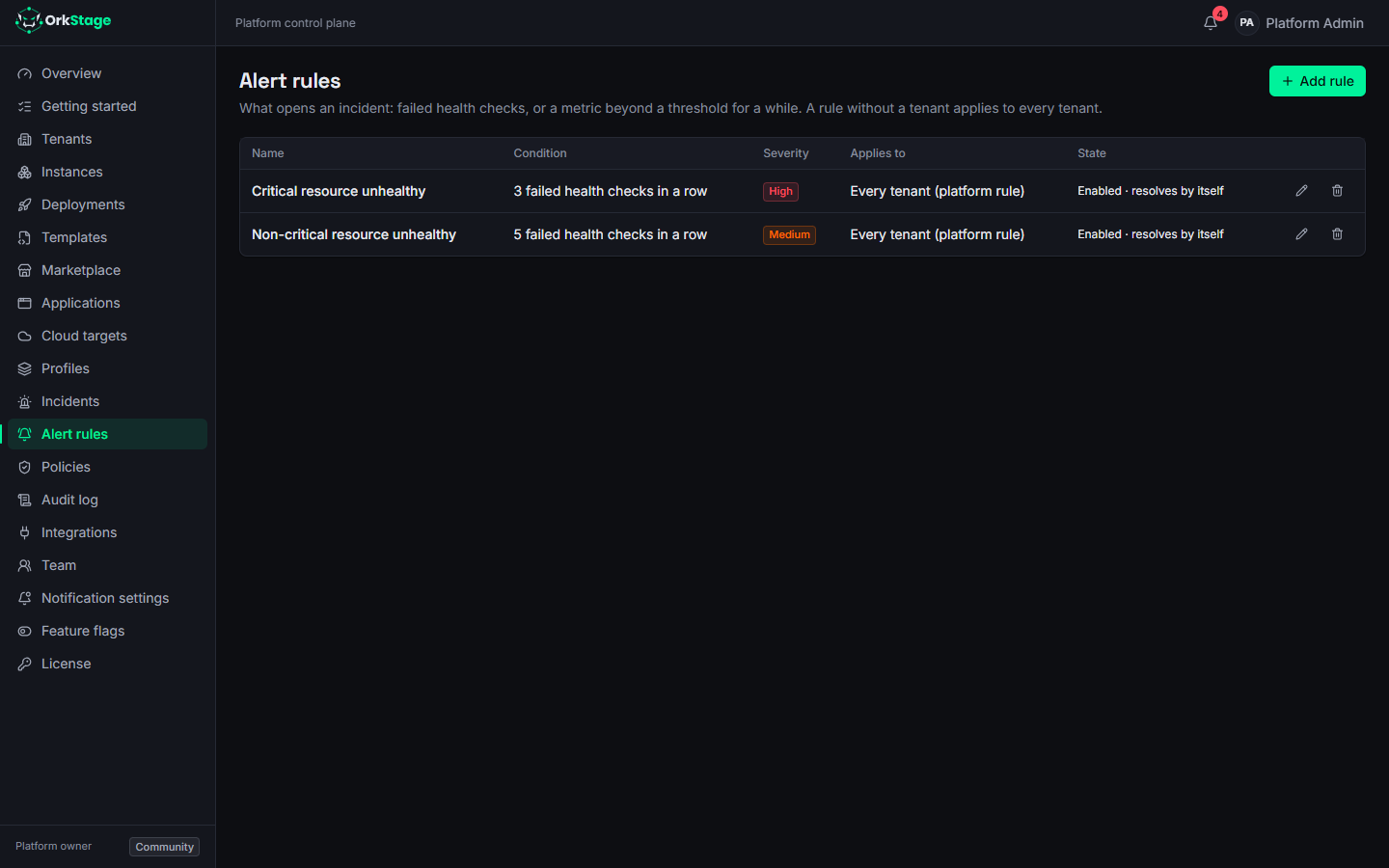
Alert rules, in the console menu (/settings/alerts), lists the rules that apply to you and
lets you add, edit, turn off and delete them.
- Platform staff manage every rule. A rule without a tenant is a platform rule and applies to every tenant.
- Tenant owners and admins manage their own tenant's rules. Other members read them.
A metric rule has these fields:
| Field | Meaning |
|---|---|
| Metric | cpu, memory, requests, errors_5xx, latency_ms or connections |
| Resources | Only one resource type, such as compute.container-service, or any resource with the metric |
| Statistic | average, maximum or minimum of the points in the window |
| Operator and threshold | >, >=, < or <= a number |
| Window | Minutes of data, one point per minute |
| Severity, cooldown | As for health rules |
| Actions | Open an incident; notify the tenant owners |
The worker reads each metric rule at most once a minute per instance, because provider metric APIs are billed per request. When the provider has no data for the window, the rule waits.
Where the metrics come from:
| Provider | Metrics |
|---|---|
| AWS | CloudWatch GetMetricData: ECS service CPU and memory; load balancer requests, 5xx errors and latency; RDS CPU and connections; ElastiCache CPU and connections |
| Simulated targets | A generated series between 20 and 60, which you can pin to a value |
| Other providers | None yet. Metric rules have no effect on them |
The same rules are available through the API at /alert-rules (GET, POST, PATCH,
DELETE). Reading needs the instances:read scope and changing needs incidents:write.
{
  "tenantId": "<tenant id>",
  "name": "API CPU above 80%",
  "condition": {
    "signal": "metric",
    "metric": "cpu",
    "resourceTypes": ["compute.container-service"],
    "statistic": "avg",
    "operator": ">",
    "threshold": 80,
    "windowMinutes": 5
  },
  "severity": "high",
  "cooldownSeconds": 900
}
Trying a metric alert on a simulated target
Pin a metric of a resource to a value, wait for the rule to fire, then let it go back:
# CPU of the resource "web" stays at 95 until you clear it
curl -X POST "$ORK_API_URL/api/v1/instances/$INSTANCE/simulate" \
  -H "Authorization: Bearer $ORK_TOKEN" -H 'Content-Type: application/json' \
  -d '{"resourceId":"web","metric":{"name":"cpu","value":95}}'

# back to the generated series
curl -X POST "$ORK_API_URL/api/v1/instances/$INSTANCE/simulate" \
  -H "Authorization: Bearer $ORK_TOKEN" -H 'Content-Type: application/json' \
  -d '{"resourceId":"web","metric":{"name":"cpu","value":null}}'
The incident opens within a minute or two of the pin, depending on the window, and resolves the same way after you clear it.
Manual incidents and updates
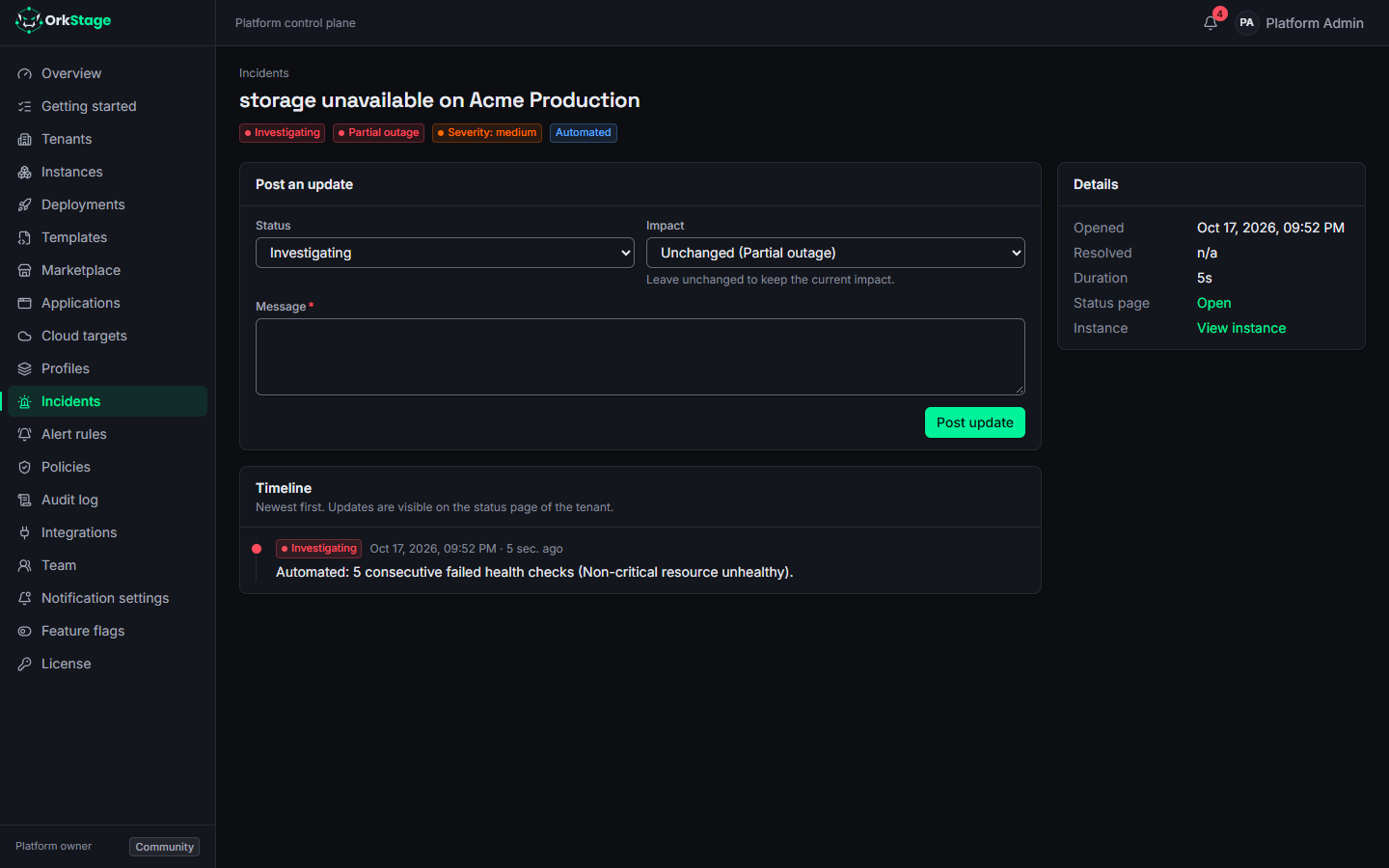
Platform staff (owners, admins and operators) can open an incident by hand and post updates. Each
update has a status, a message and an optional impact. Tenant members can read incidents and their
updates, which appear on the incident page in order. Through the API, this needs the
incidents:write scope.
Maintenance windows
Owners, admins and platform staff schedule maintenance under Settings on the status page: a title, a message, when it starts and ends, and which instance and components it covers (all of them when none are chosen).
- Before it starts, the status page lists it as scheduled.
- While it runs, its components show
MAINTENANCE, and their resources open no incidents from health or metric rules. - Subscribers and the tenant's owners and admins are told when it is scheduled, when it starts and when it ends.
- Cancelling a window that has not started deletes it. Ending a running one stops it now and keeps it in the history.
Through the API: GET, POST and PATCH /maintenance-windows, and DELETE /maintenance-windows/:id
to cancel or end one. Changing them needs the incidents:write scope.
Custom domains
Serve an instance on your own hostname. Prove you own it with a TXT record, point it at the platform, and let OrkStage watch its TLS certificate.
Notifications
Who OrkStage notifies about deployments, incidents, maintenance and domains, through which channels, and how each person chooses what reaches them.