

Topology, logs and metrics
Inspect a running OrkStage instance. The topology diagram with placement and health, drift, resource outputs, recent logs and metrics per resource.
Topology
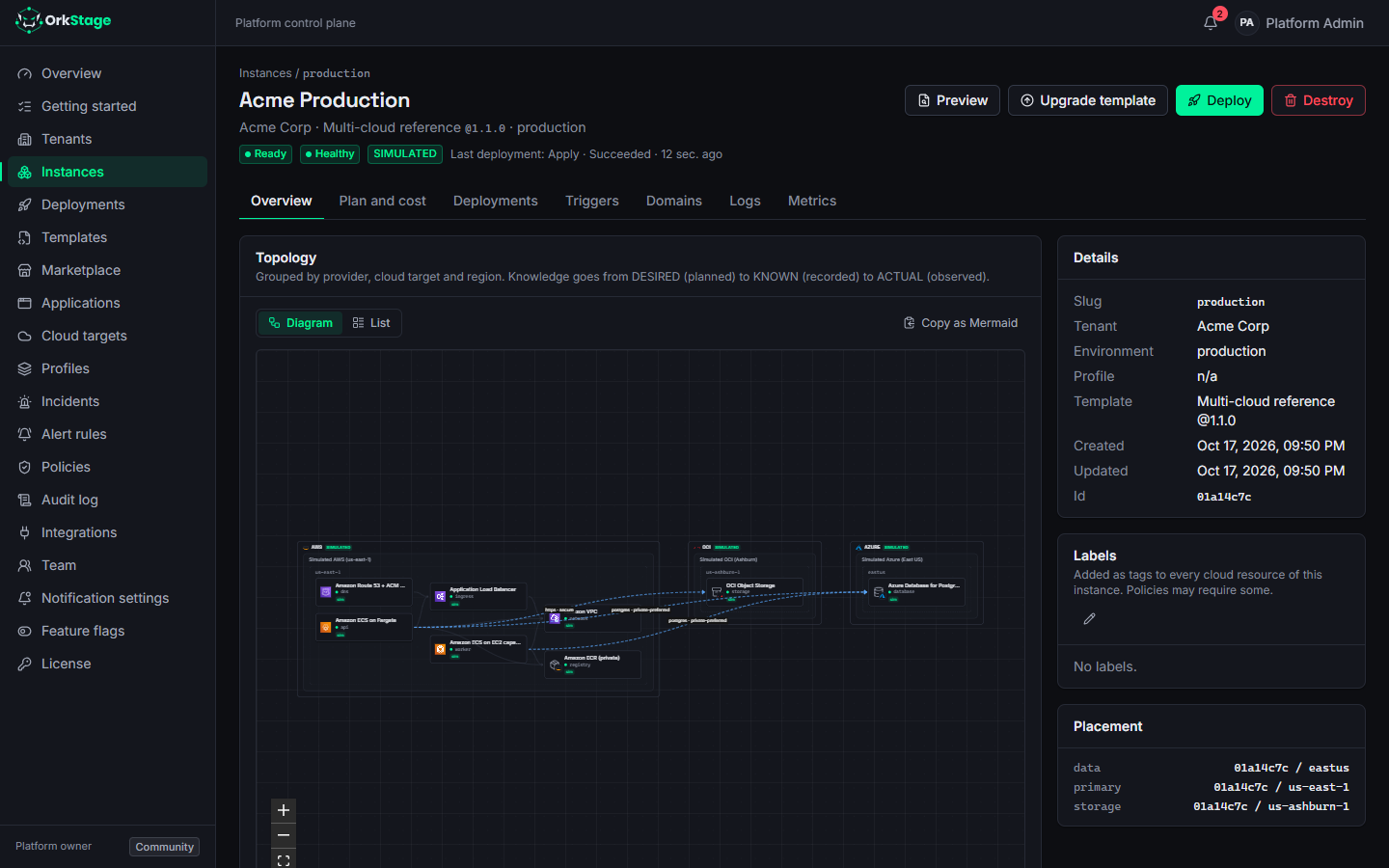
The Overview tab of an instance draws its topology. Every resource is a node, grouped by
provider, target and region. Dependency edges connect the nodes, and connectivity links carry the
strategy label, for example public-tls-allowlist between AWS and Azure. Node colors follow
health, and simulated resources carry a simulated label.
Copy as Mermaid copies the same diagram as a Mermaid flowchart, ready for a design document or a pull request description.
Below the diagram, the resource table shows each resource's type, capability, physical name, target
and region, knowledge state (DESIRED, KNOWN, ACTUAL or UNKNOWN), drift and health.
Drift
On real providers, the worker runs a scheduled drift scan. It runs every
DRIFT_CHECK_INTERVAL_MINUTES minutes (default 360), and 0 turns it off. The scan plans each
applied resource again with OpenTofu, from the snapshot it was deployed with. If that plan contains
any change, something changed outside OrkStage.
When that happens, OrkStage marks the resource DRIFT_DETECTED with the planned actions, writes an
audit event and notifies owners and admins (instance.drift_detected). Resources with a pending
change are skipped, because that change is a deployment, not drift. Deploy restores the
template's configuration.
On simulated targets, drift is checked on every health check instead.
Outputs
Each provisioned resource exposes the outputs its module produced, for example the database host
and port, the ingress url, the queue queue_url or the bucket endpoint. Secrets are never
outputs. The database password lives in AWS Secrets Manager, and services receive its ARN.
Logs
The Logs tab shows recent log lines for a resource
(GET /instances/:id/logs?resourceId=&limit=). On AWS they come from the service's CloudWatch log
group. On simulated targets they are generated.
Metrics
The Metrics tab charts CPU, memory, requests per minute, p95 latency and errors per minute for
the last hour (GET /instances/:id/metrics?resourceId=&metric=cpu&minutes=60).
On AWS the points come from CloudWatch (GetMetricData, one point per minute) for ECS services,
load balancers, RDS databases and ElastiCache clusters. The deployment role already grants
cloudwatch:GetMetricData. On simulated targets the points are generated. Other providers show no
metrics yet.
To be told when a metric crosses a threshold, add a metric rule on the Alert rules page.
Simulation controls
On simulated targets, users who can deploy or update the instance see Simulation controls: Mark unhealthy, Mark degraded, Mark healthy, Clear health override and Introduce drift (or Clear drift). They drive the loop from health to incident to notification without breaking anything real.
Triggers
Run provider actions on a deployed instance (redeploy, restart, rollback, purge cache, backup) by hand, from CI with an API key, or on a schedule.
Custom domains
Serve an instance on your own hostname. Prove you own it with a TXT record, point it at the platform, and let OrkStage watch its TLS certificate.