

Deploying and watching progress
Start an OrkStage deployment and follow it live. Approve high risk production changes, cancel, retry failed resources, upgrade and destroy safely.
Click Deploy on an instance. The API validates the request, records the deployment with all its
steps and answers at once with 202. The worker then does the work, so you can close the browser.
Phases
| Phase | What happens |
|---|---|
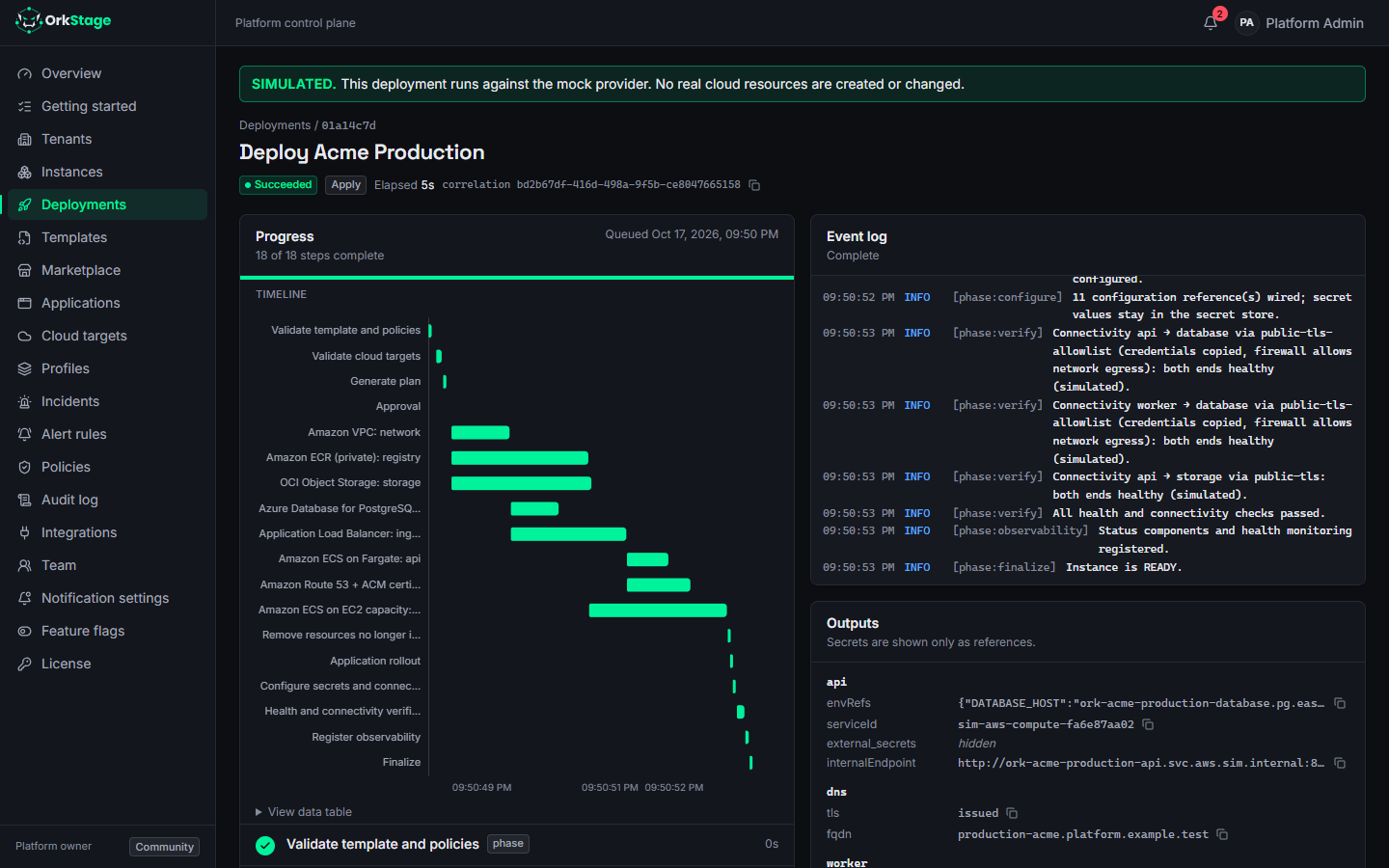
| Validate template and policies | The stored snapshot is checked again. A failing policy stops the deployment here. |
| Validate cloud targets | Checks credentials, the state bucket and, on real AWS, the IAM permissions the deployed services need. |
| Generate plan | Builds the platform diff, plus a real tofu plan for each existing resource that changes. |
| Approval | Runs only for high risk production changes (see below). Otherwise it is skipped, with the reason. |
| Resources | One step per resource, in dependency order. Independent branches run in parallel. |
| Remove resources no longer in the template | Deletes resources the instance still has but the template no longer contains (after an upgrade, or a resource turned off by a variable), dependents first. The plan lists them as deletions, so production approval covers them. A destroy protected instance keeps them, with a warning. |
| Application rollout | Services run their images by digest, so the exact image never changes under them. |
| Configure secrets and connections | Wires connection references. Secret values stay in the secret store. |
| Health and connectivity verification | Checks each resource until it is healthy, within one settle window. |
| Register observability, Finalize | Registers monitoring and moves the instance to READY or DEGRADED. |
The deployment page shows each step with its status, the Gantt timeline and the event log. It refreshes every 1.5 seconds while the deployment runs.
Approvals
A deployment of a production instance stops at AWAITING_APPROVAL when the change is high risk.
That happens in two cases:
- The platform plan deletes or replaces a resource, or changes an existing database.
- The provider plan deletes or replaces something. This is a real
tofu plan, run for each changed resource during the plan phase. It can find a replacement even when the platform diff shows only an update, for example when an attribute forces replacement. Routine ECS task definition revisions do not count.
The event log shows the provider plan for every changed resource, and destructive ones appear as warnings:
WARN  [phase:plan] ingress: 1 to add, 0 to change, 1 to destroy — replace aws_lb_target_group.route[0]
WARN  [phase:plan] The provider plan deletes or replaces existing resources: production approval required.
WARN  [phase:approval] High-risk production change: waiting for approval.
OrkStage notifies the owners and admins, and the deployment.awaiting_approval webhook fires. A
user with the approve permission clicks Approve, and the deployment continues.
When the plan contains no high risk change, the approval step is marked skipped with the reason
Not needed: no high-risk or destructive changes planned. Instances in other environments
(staging, development, sandbox) never wait for approval.
Failures, retries and cancel
- Transient failures, such as throttling and timeouts, are retried with exponential backoff. Destructive operations are never retried automatically.
- A failed resource skips only the resources that depend on it, and unrelated branches finish. Partial failure is a normal outcome, shown per resource. In this example the database fails, so the API that depends on it is skipped, while storage and the cache finish:
- Retry runs only the failed and skipped resources again. Resources that already converged are left alone.
- Cancel stops the deployment cooperatively. The worker checks for the request while it runs, and resources that have not started yet are marked cancelled.
- If the worker restarts, the deployment resumes. Finished phases are skipped, and converged resources (same idempotency key) are not applied again.
Resources deleted outside OrkStage
Someone may delete a resource directly in the provider console. During verification, OrkStage asks
the provider whether each resource still exists. A missing resource fails verification at once,
with the message Resource no longer exists at the provider. Redeploy to re-create it., instead of
waiting for it to settle. The next deployment creates it again.
Upgrading the template
Change template version shows the plan from what runs now to the chosen version (what is created, updated and deleted), then starts a deployment of that version. The instance keeps its current version until that deployment succeeds, so a failed upgrade leaves it on the version that actually runs; Retry continues the upgrade. Choosing an older version rolls back the same way. Production upgrades that delete or replace resources wait for approval. An instance never changes version on its own.
Through the API: POST /instances/{id}/preview?templateVersionId={version} returns the plan, and
POST /instances/{id}/upgrade with { "templateVersionId": "..." } starts the deployment.
Destroying
Destroy removes every cloud resource in reverse dependency order:
To confirm, you type the instance slug. An instance marked Destroy protected refuses to be
destroyed. Only customer owners and admins, and platform owners and admins, can destroy an
instance. Destroying a production instance also waits for an approval before anything is
deleted; cancelling it at that point leaves the instance READY.
The backup phase checks that a backup policy exists. It does not yet verify that a backup can be restored.
Reviewing plan & cost
Read an OrkStage plan before you deploy. Placement per provider, policy results, connectivity across clouds, monthly cost, the diff and its risk.
Triggers
Run provider actions on a deployed instance (redeploy, restart, rollback, purge cache, backup) by hand, from CI with an API key, or on a schedule.